How to read your Dayforce pay statement
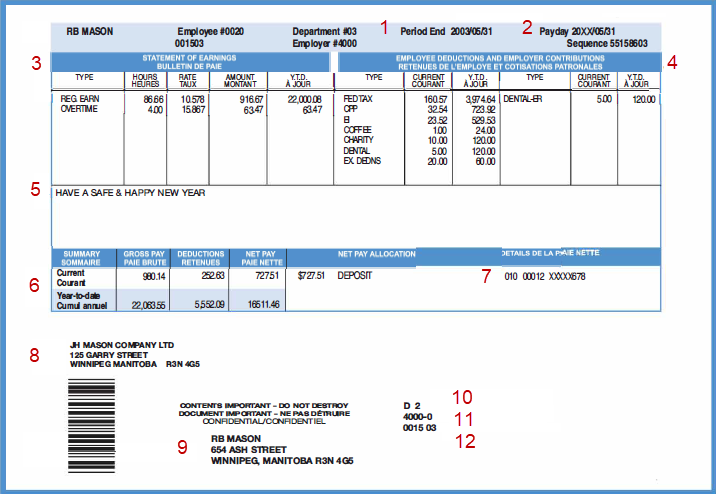
 Pay period end date
 Pay date
 Statement of earnings
 Employee deductions & Employer contributions
 Company messages
 Current & year-to-date amounts
 Banking information
 Employer name
 Employee’s name & address
 D = deposit. If D doesn't display, a cheque produced.
EXTRA = second payment for either a cheque or deposit
 Employer number
 Job costing code
Internal
Last modified: 11/13/2026
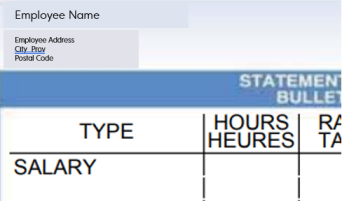
Note: Employee addresses show by default at the bottom of sealed printed pay statements and pay statements in the EFT Statement file in Powerpay Reports, and under the employee name on online pay statements.
The employee address now shows under the employee name on the Online Pay Statement:
Types of Pay Statements
-
Cheques - printed and delivered to the distribution address for the company
-
Direct Deposit Statements
-
Can be printed and delivered to the distribution address for the company, hosted in Powerpay Reports, or delivered to Powerpay Self Service
-
-
Third Party Payments
-
Can be payable to a Dayforce partner vendor with the Benefit program - no statement is produced
-
Can be payable to a third party such as a Union with a cheque or a direct deposit (must be to a depositable account such as a chequing or savings account) - a statement is produced - delivered to the distribution address for the company or hosted in Powerpay Reports.
-
-
Garnishments
-
Can be paid directly to FRO Ontario - no statement is produced
-
In most cases these are produced as cheques, printed and delivered to the distribution address for the company
-
-
Online Statements - delivered to Powerpay Self Service